

The local web UI: FastAPI inside the app
A physical knob would be optimal. Building one, not. I put the UI in the browser and made it reachable from any device on the LAN.
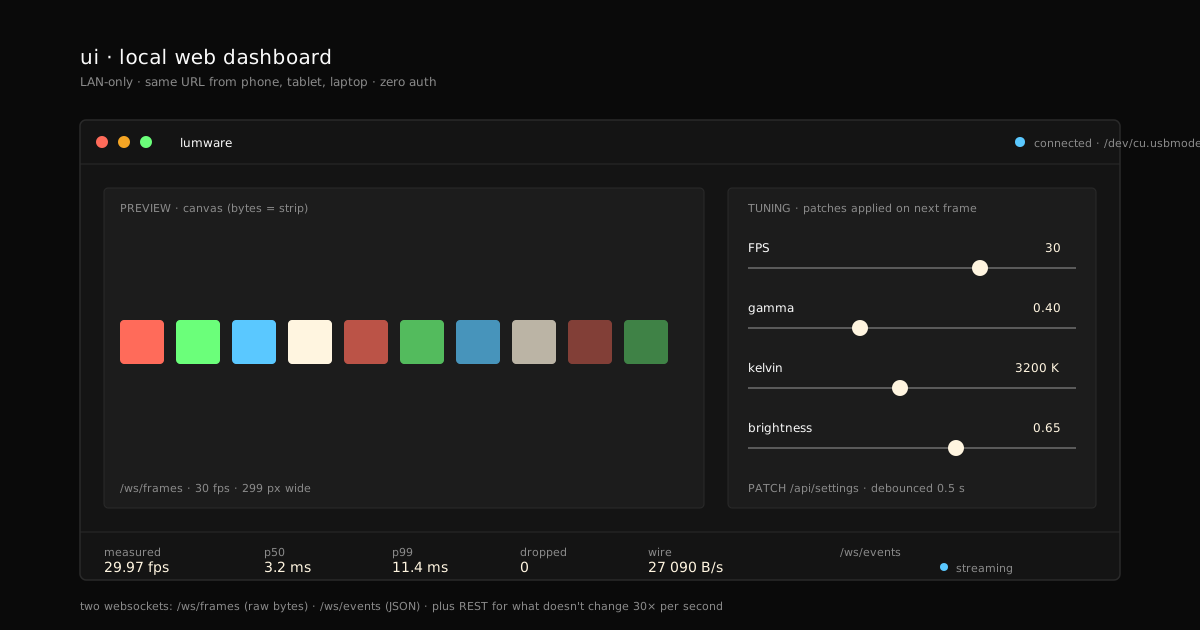
A physical knob box would be optimal. Building one, not. I put the UI in the browser and made it reachable from any device on the local network. A pragmatic call, not a manifesto.
The context
Lumware runs on the laptop or a Raspberry Pi. But I want to adjust brightness from my phone while I’m physically touching the strip three meters from the screen. A native app per platform is absurd for a personal project. A local web server fixes everything at once:
- Zero install on the control device — just a browser.
- Same URL from phone, tablet, or laptop.
- Zero app-store permissions, zero cross builds.
The cost is adding a server to the host process. But the host is already a long-running process — one more server doesn’t change the model.
Preview = strip. With
--transport virtualthe host boots without an Arduino: the final frame lands in a memory ring buffer, and the UI receives exactly the same bytes the strip would receive. On first boot the app seeds the bundledcalib-*.pngpatterns into the resources directory so you can press Play immediately.
The decision
FastAPI for HTTP + WebSocket. React + Vite + Tailwind for the frontend, built to static and served by FastAPI itself. Everything packed with PyInstaller into a single binary.
Two WebSocket channels
/ws/frames — raw binary bytes. Each message is a
frame: N × 3 RGB bytes, no JSON, no header, no codec.
Exactly the same byte sequence the codec sends to the
transport, but before the binary-frame encoding (no
SOF, no CRC). Why: this way the UI preview is by
design the same thing the strip sees. There cannot be a
“preview doesn’t match strip” bug because it’s literally
the same source.
/ws/events — bus events serialized to JSON. The UI
gets PLAYBACK_METRICS, TRANSPORT_*, SETTINGS_CHANGED,
etc. It draws charts, updates the connection indicator,
shows logs. Want a new view? Subscribe to an event that
already exists.
REST for what doesn’t change 30 times a second
GET /api/health— alive?GET /api/ports— serial port autodetection.POST /api/connection/connect—{port, baud}.POST /api/playback/{play,pause,stop}.GET /api/resources— list images/videos.PATCH /api/settings— partial Settings patch.
Each handler takes its dependencies via FastAPI’s
Depends(). Tests use TestClient and build the deps
manually — the create_app(...) factory is the seam.
LAN-only by design. No auth. CORS is wide open. That looks like a vulnerability until you remember the real scenario: one user, a private network, a physical device wired to the host over USB. If someone is on your LAN and wants to mess with you, they have bigger problems than an API that nudges your strip’s gamma. Adding login complicates the code, complicates the UX (re-auth on the phone every time?), and adds no real security to the threat model. The server listens on
0.0.0.0:8080but the README is explicit: do not expose to the public internet.
The frontend is React out of pragmatism
Not aesthetics. Vite + React + Tailwind is what I can
stand up fastest with tests (vitest), types
(tsconfig.app), and deterministic builds. Story 07-07
bundles Vite’s dist/ inside the PyInstaller package —
the final binary holds frontend and backend in one file.
Until that build exists, FastAPI serves a placeholder
HTML with the version and a note: “build the frontend
with npm run build”.
What comes next
The whole system is on the table. What’s left is the moment of truth: the numbers. How many FPS we actually hit, what the cable’s latency is, where the bottleneck lives. Final post of the series: framerate and bottlenecks.