

Geofence: knowing you arrived without you saying so
A check-in is the silliest piece of friction in software. Always-on GPS is surveillance. In between lives the geofence: a confirmed arrival and auto-complete on the way out.
A check-in is the silliest piece of friction in software. The user is already there — you can literally see their car. Asking them to confirm means you haven’t looked at their GPS.
The context
Trip mode needs to know when a destination has been visited. If it doesn’t know, it can’t advance the day’s card. If it doesn’t advance, the main screen stays stuck on destination 1 while you’re already eating lunch at destination 2.
The obvious option is a “mark as visited” button. The obvious option works… until you forget. If you forget, the route looks broken. If the route looks broken, you stop using the app two hours in.
The other obvious option is always-on GPS — continuous tracking. It works, but then the app knows where you are every minute, also when you’re asleep, also three days after the trip if you forget to stop it. No.
The decision
Geofence with confirmation and auto-complete:
- Around each planned destination, a virtual ring of 75–200 m radius by stop type — a viewpoint wants 75 so it doesn’t trip on the shop next door; a rural activity, 200 so your GPS arc actually enters it. You can fine-tune it per stop.
- The phone’s browser listens to enter/leave events (Geolocation API + visibility hint), not positions every second.
- An entry is filtered for 3 seconds before it counts: a GPS flicker at the boundary fires nothing. When you really enter, a one-tap confirmation appears — no check-in from scratch, no silent marking.
- When you leave a stop you’d arrived at, a 5-minute
timer closes it on its own (
completed) if you didn’t — so the day’s card moves on without you thinking about it.
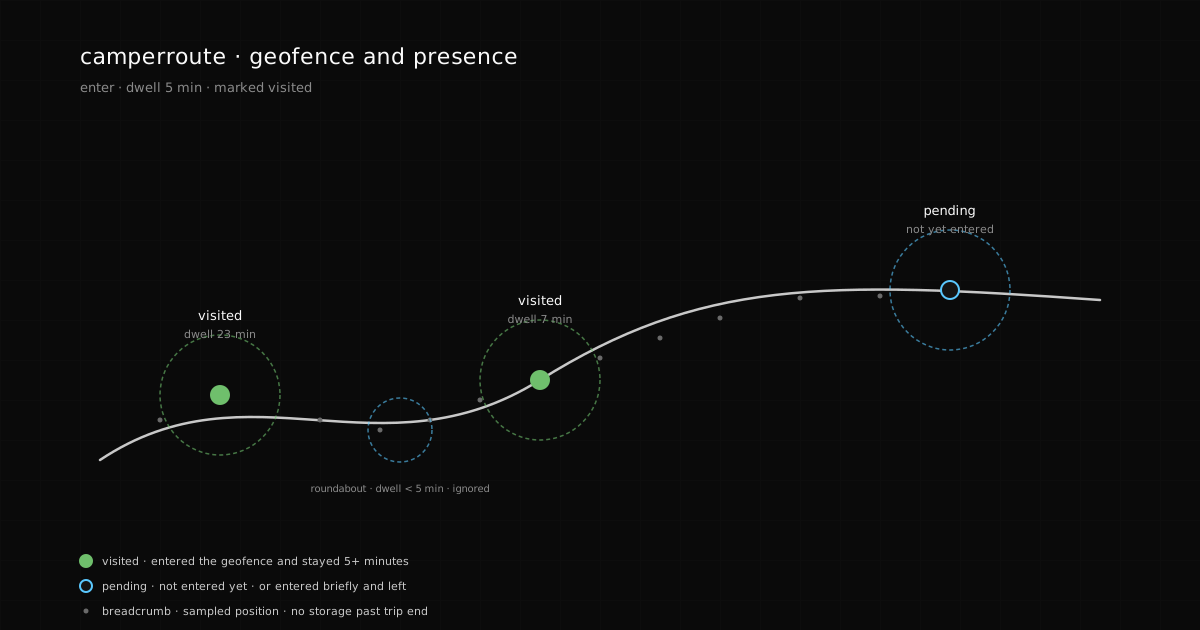
Why a filter and not instant marking. A GPS flicker at the edge of the ring behaves like a false entry. Fire on the first reading and you mark phantom destinations. The 3-second debounce is the cheapest filter: if you’re still inside after it, you’ve really entered. And since the
arrived→completedstep is handled by auto-complete on the way out, you never get stuck with a card pinned to a stop you’ve already left behind.
What it’s not
To be explicit:
- Not continuous tracking. We don’t log your position every minute; only boundary events (enter/leave) on points you have already marked as destinations.
- Not real-time navigation. The app doesn’t tell you “turn right”. Waze and Google Maps exist for that.
- Not always-on. When trip mode closes, the geofence listeners are destroyed. No background tracking between trips.
What’s next
Next post: how the leap from “POIs and a route” to useful data on the map happens — fuel prices, open/closed status, restrictions. The difference between a pretty map and a map that saves you money.